How do I insert my Zeller SIM Card?
The Zeller SIM Card pack contains a punch-out card with a standard-sized SIM, which is only compatible with Zeller Terminal.
The Zeller Terminal has a slot on the rear of the device to insert the SIM card.
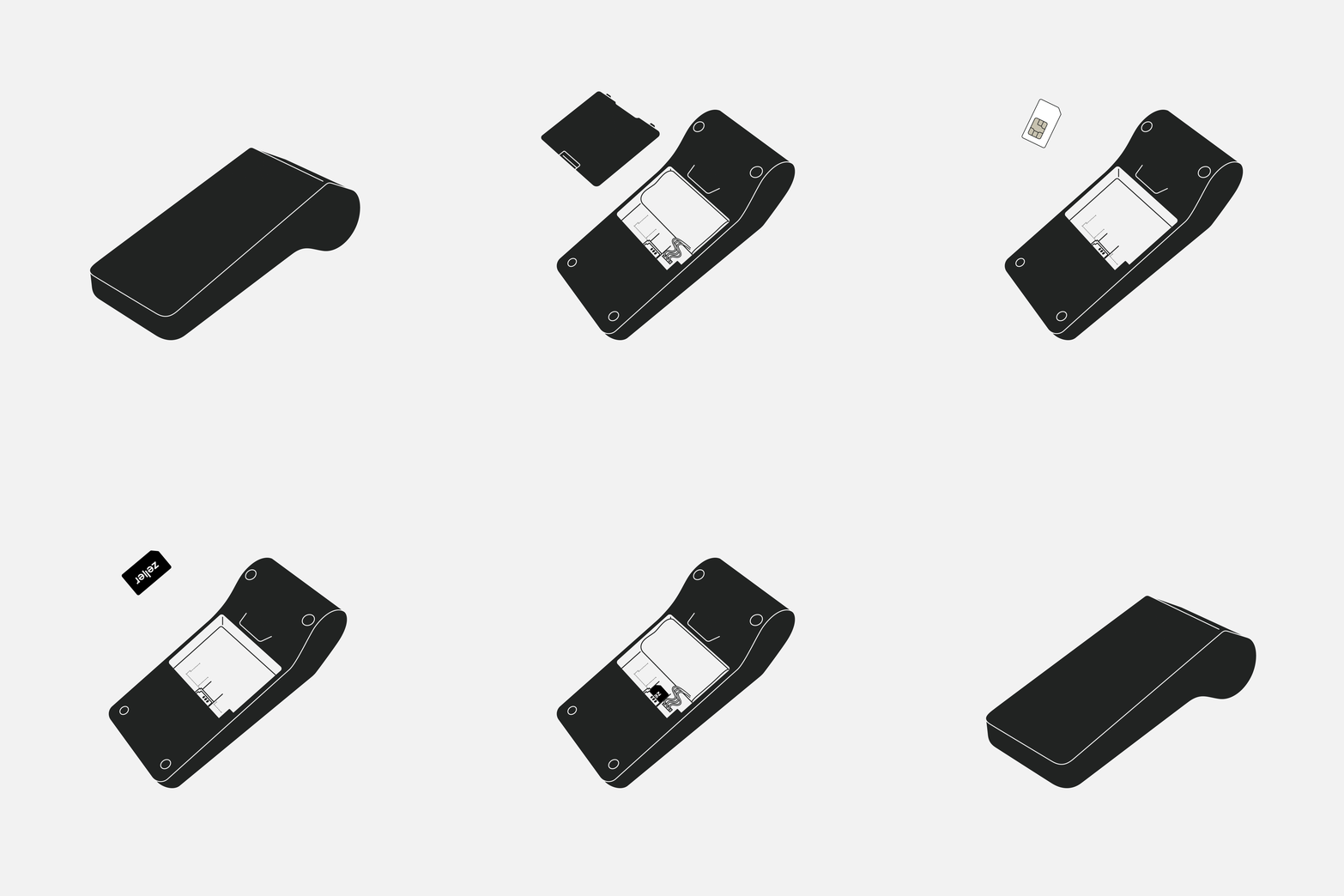
For more details on how to insert and activate your Zeller SIM Card, follow the steps below:
- Power off and turn over your Zeller Terminal so the screen is faced down.
- Remove the rear cover and battery.
- Insert the SIM card into the SIM slot.
- Re-insert the battery and close the cover.
- Turn on your Zeller Terminal.
- Accept the Zeller SIM Terms and Conditions.
Your Zeller SIM will be activated immediately and you can now accept payments with Zeller Terminal.
If you're experiencing any issues with setting up your Zeller SIM Card, please get in touch with our Support team for further assistance.
Related articles
- How do I update my Zeller SIM billing account?
- How do I obtain statements for my Zeller SIM Card?
- How do I cancel my Zeller SIM Card?
- Setting up Zeller Powered Stand
- How do I view my SIM card connection details?
- Where do I buy more receipt paper?
- How can I view details of my Zeller SIM Card?
- How is my Zeller SIM Card subscription billed?
- Getting started with Zeller SIM Card
