Business Growth & Optimisation

8 Black Friday Strategies to Maximise Your Sales in 2025

Love it or hate it, Black Friday is here to stay and if your business is taking part, you’ll be tapping into the $6.7 billion that is set to be splashed over the Black Friday–Cyber Monday weekend this year—a 4% increase on last year’s figures.  Black Friday—falling on Friday 28 November, 2025—has become the unofficial start of Australia’s Christmas shopping season. In recent years, it has evolved from a single day into a full sales period, with many retailers launching promotions as early as 18 November. With Australians spending at record levels, now is the time for retailers to make sure they’re set up to capture as much of that demand as possible. To help you prepare, we’ve put together 8 Black Friday strategies to maximise your success during the year’s busiest sales weekend. 1. Give your customers FOMO Black Friday shoppers expect to see limited-time deals. By giving them a sense of FOMO (fear of missing out), they’re much more likely to buy immediately instead of waiting or shopping around. Similarly, if customers think stock is limited or the deal is exclusive, the perceived value increases, even if they weren’t planning on buying right away. FOMO reduces the time a customer spends comparing or overthinking. They’re less likely to abandon their cart if they feel they might lose the deal.  Ensure your website and/or your store clearly communicate urgency. Use messaging like: “Ends at midnight”, “Only 24 hours left”, “Only 12 left at this price”, “Selling fast—over 500 sold today.” You could also use countdown timers on your website or on your social media. Learn how to add a countdown timer to your Instagram story here . Just be aware that if you advertise a limited-time offer, you are legally obligated to honour it under Australian Consumer Law (see point 7 for more on this). 2. Create deals without discounts Get creative with your Black Friday offers. If your margins are tight, you don’t have to rely on blanket discounts to drive sales, you could try bundles, tiered deals like “Buy More, Save More,” hourly flash sales, mystery boxes, or limited-edition drops that create excitement without reducing prices.  Focus on your best-sellers or high-intent products to maximise conversions, and don’t be afraid to test different formats throughout the weekend to see what resonates with your audience. Pair every offer with clear urgency (see above) to encourage shoppers to act quickly.  3. Offer Buy Now Pay Later options Many customers use Black Friday and Cyber Monday sales as an opportunity to tick off their entire Christmas shopping list. While it’s a big outlay for just one weekend, Buy Now Pay Later (BNPL) programs like Afterpay, Zip, and Klarna make it more manageable by allowing customers to spread payments over weeks or months. This flexibility encourages shoppers to buy more than they might with a single upfront payment, helping businesses increase basket sizes, and sell higher-ticket items.  Ahead of Black Friday weekend, speak to your payment provider about integrating a BNPL option to your online or in-store sales. With Zeller Terminal , setting up Afterpay is straightforward. Simply follow the steps to offer Afterpay card payments with Zeller Terminal here .  4. Offer early access to subscribers If you already have an email database, make the most of it in the lead-up to Black Friday by giving subscribers early access to your offers. Exclusive previews not only drive anticipation but also reward loyal customers. If you run a loyalty program, consider offering bigger discounts to your VIP members or inviting them to an after-hours, invite-only shopping event. These personalised perks create a sense of novelty and recognition—and the more valued your customers feel, the more likely they are to make a purchase. 5. Ensure your checkout is optimised If you run an online-only store, your website will make or break your Black Friday performance. With higher traffic expected, speak to your web developer ahead of time to ensure your site can handle the surge. Even a few seconds of slow loading—or friction in the checkout process—can quickly translate into abandoned carts and lost revenue. The same principle applies in-store: your payment experience must be fast, reliable, and friction-free. Slow EFTPOS machines, limited card acceptance, or high transaction fees can lead to frustrated customers and reduced profits. Zeller Terminal accepts all cards—including American Express and China UnionPay —for one low flat fee of 1.4%, and you can enable surcharging for a fee-free solution. Zeller also gives you built-in backup. If you realise you need extra terminals to keep up with demand, you can turn your phone into an EFTPOS machine. Simply download Zeller App and enable Tap to Pay . It takes minutes to set up and could save you thousands in missed sales if queues start forming.  6. Boost your customer support More customers mean more customer service — so it pays to be prepared. Whether that’s rostering on additional staff, updating and expanding the FAQ section of your website, or integrating a chatbot to handle common queries, planning ahead helps you stay ahead of the rush. The smoother and more responsive your support experience is, the easier it is to keep customers happy throughout the Black Friday weekend, reduce pressure on your team, and prevent small issues from turning into lost sales. 7. Avoid false advertising Although you might be tempted to extend a limited-time offer if you’re flooded with sales, this would constitute false advertising under Australian Consumer Law. It pays to understand what your legal obligations are ahead of time, so that you can steer clear of unlawful advertising.  Businesses cannot falsely claim “site-wide” or “store-wide” sales, if not everything is on sale. You also cannot state “up to X% off” promotions if only a handful of products reach that discount, and you cannot use “was/now” strikethrough pricing that isn’t supported by a genuine previous selling price. Retailers also shouldn’t create a false sense of urgency through misleading limited-time offers or hide important exclusions and conditions in fine print. The ACCC actively monitors Black Friday promotions and can issue infringement notices and significant penalties for breaches.  While consumers are entitled to refunds for faulty products, retailers may set conditions on change-of-mind returns during sales periods provided these policies are clearly communicated. Ahead of Black Friday weekend, ensure you have updated the returns policy on your receipts.  With Zeller, you can quickly change the information that appears on receipts from either your Zeller Dashboard or directly on Zeller Terminal. Learn how to customise your Zeller receipt setting here . 8. Follow up after purchase Black Friday shouldn’t just be seen as a one-off sales event—it’s also an opportunity to capture new customer data and turn one-time shoppers into repeat buyers. For online stores, this is straightforward, as customer information is automatically collected and stored in your CMS. For bricks-and-mortar retailers, it requires a bit more creativity. Encourage customers to join your mailing list or follow your social accounts by offering a small gift or extra discount, run a competition requiring an email entry, or use QR codes at the point of sale to collect contact details. With Zeller, you can add a custom image to your receipts or terminal screensaver featuring a QR code that links to your newsletter signup or Instagram account. By making it easy for customers to engage at checkout—when they already have their phones out to pay—you create a frictionless way to build a valuable database of engaged customers. This enables you to follow up with targeted offers and promotions long after Black Friday has ended.

Zeller Dashboard: The Powerhouse Behind Your Business Cash Flow

The difference between a business that thrives and one that stalls often comes down to one thing: how well cash flow is managed. In this article, we explain why having a real-time reporting engine like Zeller Dashboard is key to your cash flow management strategy – and why your bank is holding you back . The key to healthy business cash flow is twofold: monitoring and acting . Knowing where your cash is coming from and going is one thing; using that insight to guide your decisions is another. Master both, and you’ll strengthen your business’s financial health – setting yourself up for long-term success and growth.  However, keeping track of your finances can quickly become overwhelming when cash is moving through multiple bank accounts, EFTPOS systems, invoicing tools, and expense platforms. One of the smartest cash flow management strategies is to bring everything together in one place. That’s where Zeller Dashboard comes in. By uniting your business’s financial activity in one online dashboard, it gives you detailed insights and real-time visibility that your traditional bank can’t match. From tracking sales and invoice payments to managing expenses and accruing interest, read on to discover three ways you can harness Zeller Dashboard to take control of your business cash flow. What is Zeller Dashboard? Zeller is an all-in-one financial platform that helps businesses accept payments, manage their money, and pay expenses – all from one place. At the heart of it is Zeller Dashboard: a central hub for tracking your financial position in real-time, and enabling you to use that data and insight to improve business cash flow. It transforms your financial information into clear, actionable reports and insights that help you make smarter, more informed decisions. Every way that cash flows in and out of your business is tracked on Zeller Dashboard. Read on to learn how. 1. Cash flow in: card payments, invoices, and POS See all your incoming sales in one place – no matter how your customers pay. In Zeller Dashboard, your latest transactions are automatically compiled into a single report under the Payments tab (and in the Latest Payments preview on the Overview page). This report brings together payments from five different sources: Terminal, Point of Sale, Invoice, Dashboard, and Zeller App. Below, we’ve outlined each source and explained how to uncover specific insights for each within Zeller Dashboard. 1. Terminal Terminal refers to any payment accepted through Zeller Terminal . If your business uses multiple terminals, you can rename each device for easy identification and more detailed tracking. For example, to find a specific transaction processed at your ‘Front Bar – St Kilda’ device, simply filter transactions by that terminal name. You can also assign terminals to specific sites, allowing you to view all payments from a particular location by filtering by Site. To filter transactions, go to Payments > Transactions, then click on the magnifying glass icon in the top right hand corner. 2. Point of Sale Point of Sale refers to any payment processed through your POS system – whether it’s Zeller POS Lite or another POS integrated with Zeller Terminal . If you’re using Zeller POS Lite, you can view detailed insights into your sales within Zeller Dashboard by navigating to the POS Lite tab. Here, you’ll find visual reports showing your Top Items by Revenue and Top Items by Quantity Sold. For deeper analysis, you can export a detailed sales breakdown – including the number of units sold, prices, SKUs, and categories – to create customised reports. You can also filter by specific dates and times, such as reviewing how many of one item you sold during the Christmas period last year compared to the year before, helping you forecast stock and ingredient orders more accurately. 3. Invoice Invoice refers to any Zeller Invoice paid by card (invoices paid via bank transfer appear in the Finance tab – see below). In the Invoices tab, you can view all your invoices – paid, unpaid, or drafted – and filter them to find exactly what you need. You can also create new invoices directly from this tab, making it easy to manage your billing in one place. To see a rolled-up or month-by-month summary of all your invoice payments, head to the Overview page and filter by Invoices. This gives you a clear snapshot of your invoicing performance and cash flow at a glance. 4. Dashboard  Dashboard payments refer to any payment received via Zeller Virtual Terminal . This feature lets you send a secure payment link directly from Zeller Dashboard via email, SMS, or any platform you choose. Your customers can then pay privately using their card details, from anywhere, at their convenience. You can find more detailed reporting about these payments under Transactions within the Payments tab. 5. Zeller App  Zeller App Payments refer to any sales made using Tap to Pay on Zeller App , an EFTPOS solution that works on Apple and Android smartphones. Like Zeller Terminal, you can name your devices for easy tracking – for example, ‘Helen’s iPhone XR’ – and assign them to specific sites, then filter transactions by device or site on the Transactions page. Sales from the above channels are settled nightly, 365 days a year. Once settled into your Zeller Transaction Account , your balance is updated automatically on the Accounts page, as well as in the Finance tab on the Overview page. From here, your funds are ready to be used.  2. Cash flow out: debit cards and expense management Once your funds have settled, they’re ready to pay for your business expenses. For even greater clarity on where your money is going, Zeller Dashboard lets you create unlimited accounts and cards, giving you detailed insights into your outgoing cash flow. A smart cash flow management strategy is to set up multiple Zeller Transaction Accounts for different purposes – for example, marketing, direct costs, GST/PAYG/Super, operations, payroll, rent, or subscriptions and software. You can then link individual Zeller Debit or Corporate Cards to each account. Corporate cards are especially useful for managing team or project expenses, allowing you to set individual budgets, reset periods, and maximum transaction limits per card. In the Accounts tab, you can view your total available balance at a glance and track all transactions, including settlements, transfers in and out, and card spending. 3. Cash accrued: growing your business savings and cash flow management strategies By regularly monitoring the Payments and Finance tabs in Zeller Dashboard, you’ll gain a clear picture of your business’s cash inflows and outflows over time. What you do with these insights is what will make the biggest difference in improving your cash flow. Here’s how you can harness Zeller Dashboard to inform decisions that strengthen your finances: Daily: Review transactions in real time Whether you’re on your laptop or checking via the Zeller App , make a habit of reviewing sales and expenses throughout the day. Watch for anything that seems out of place – unusually low transaction values or unexpectedly high expenses. You know your business, so spotting outliers is often quick and easy. Once a week: Review the previous week’s sales At the start or end of each week, compare last week’s sales in Zeller Dashboard against your goals or past results. If you’ve fallen short, act early: increase sales, cut non-essential spending, or both. This could mean ramping up marketing efforts or pausing discretionary expenses until cash flow improves. Once a month: Identify trends With a month of data, start spotting patterns – busiest days, peak trading hours, and product performance. Use these insights to optimise staffing, opening hours, and stock levels, ensuring you’re resourced where and when demand is highest. Comparing month-to-month or year-on-year data can reveal seasonal trends. For example, October is the time to prepare for the busy summer season: reviewing last year’s sales can help you know when to hire Christmas casuals or order extra stock. Ongoing: Build a cash reserve Once you know roughly how much surplus cash you generate each week – profits not needed for immediate spending – consider scheduling automatic transfers to Zeller Savings Account , where these funds can earn up to 4% p.a. interest. A cash reserve is essential for covering late payments, rising overheads, overstocked inventory, or seasonal fluctuations. It also provides a safety net for unforeseen expenses, like equipment breakdowns, legal costs, sudden operational increases, or economic downturns.

A Guide to AI for Small Business: 3 Essential Tools and How to Use Them

If you’re a business owner, who is open to the idea of embracing new technology, but haven’t yet entered the chat with artificial intelligence, this article is for you. Here, we outline the best AI tools for small business, and how you can use them to save time – and money – in your day-to-day operations. Artificial intelligence is quickly becoming a staple tool for business owners who want to save time and work more efficiently. According to the Australian Government, 41% of small and medium-sized enterprises are already using it. While there are a growing number of highly sophisticated paid platforms that can do everything from automating complex workflows (think Zapier , Make , and Power Automate ) to integrating AI agents to respond to social comments or customer queries ( Manychat , Tidio , and Intercom ), and automate inventory operations ( Zoho and Cin7 ), not every business needs these advanced tools. AI for small businesses with fewer resources and smaller budgets looks a little different. Read on to discover the best free AI tools and how best to use them for your small business.  But first, what is AI? Artificial intelligence (AI) refers to computer systems that can perform tasks typically requiring human intelligence – like understanding language, recognising images, or making decisions. By analysing large amounts of data and learning from patterns, AI tools can generate insights, create content, and improve their performance over time. What are AI tools? AI tools are applications that use artificial intelligence to carry out specific tasks – such as writing text, designing images, analysing data, or answering questions. They take the complex capabilities of AI and package them into easy-to-use software that anyone can access, often for free or at a low cost. Perplexity, ChatGPT, and Canva AI, are three such tools, which we will discuss in more detail below. The best AI tools for small businesses are those that simplify and reduce the time spent on essential but time-consuming tasks – like copywriting, marketing, branding, customer service, or design – freeing you up to focus on the core aspects of your business. Top three AI tools for small businesses: 1. Perplexity What is Perplexity? Perplexity AI is an AI-powered search and answer engine that combines natural language understanding with real-time web research. It retrieves factual information with citations for its answers, and continuously updates from the internet, providing current and trustworthy data. What it’s great for: doing research and generating concise, factual answers. What it’s not great for: creative content generation or conversational dialogue.  How to use Perplexity AI for small businesses 2. ChatGPT  What is ChatGPT? ChatGPT is an AI-powered chatbot that understands and generates human-like text by analysing language patterns from vast amounts of data, enabling it to deliver natural, helpful responses. It can answer questions, write and edit content, brainstorm ideas, and simplify complex topics.  What it’s great for: creative and conversational tasks like writing, brainstorming, and coding. What it’s not great for: doing research, as it can produce inaccurate or outdated information. How to use ChatGPT for small businesses 3. Canva AI What is Canva AI? Canva AI is an artificial intelligence tool built into Canva that helps users quickly create professional-looking designs. It can generate images, illustrations, social media graphics, templates, and other visual content from simple prompts, saving time and making design accessible even for non-designers. What it’s great for: creating professional-looking, simple designs and visuals for digital use. What it’s not great for: creating highly customised or complex designs, or anything that will be used for large-format printing. How to use Canva AI for small businesses A word of warning when using AI for small businesses While AI tools like Perplexity, ChatGPT, and Canva AI can save time and inspire creative ideas, they aren’t perfect. Always double-check facts, verify sources, and review content for accuracy before using it to make business decisions. Similarly, AI-generated designs can be great, but the imagery may not always be 100% accurate – it’s not unusual for a hand to have an extra finger, or for objects to be floating in midair! So ensure you always inspect the images closely before using them. Also, AI-generated designs can resemble stock images or copyrighted styles and will lack the resolution required for printing, so if you are going to be sharing the assets widely (for example in a paid advertising campaign or printed on a product label), it’s important to involve the expertise of a professional graphic designer. Always remember to treat AI as a helpful assistant – not a replacement for your judgment or expertise.

How to Sign Up to Zeller in Under 10 Minutes

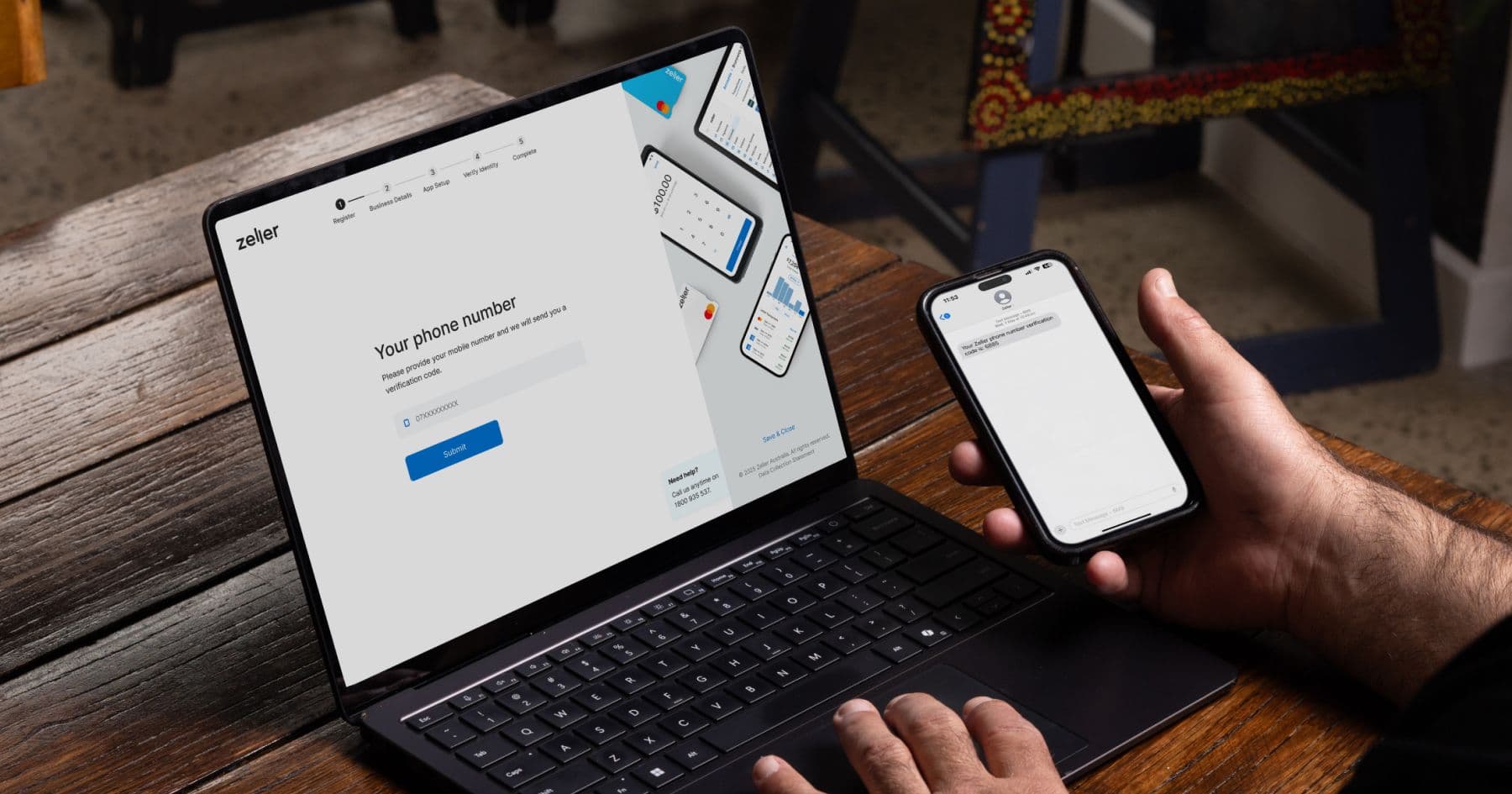
As a business owner, you don’t have time to be visiting bank branches and chasing paperwork. At Zeller, we understand that. It’s why we’ve built an entirely online sign-up process designed around speed, security, and simplicity. The majority of businesses can access their Zeller Account and begin accepting payments, sending invoices, and managing their finances the very same day. To help you breeze through the sign-up process, this article outlines what to expect and the documents you’ll need. It also explains the security measures we take to protect your data and account, and answers common questions to help you feel confident in choosing Zeller. How Zeller’s sign-up process works Signing up to Zeller is easy and can be done on a desktop computer via our sign-up page or directly on Zeller App . Here’s what to expect from the process: Register online – Open your Zeller Account with your email address, and phone number. We’ll send you a verification code via SMS, so make sure you’ve got your phone nearby.  Enter business details – If you have an ABN or ACN, you’ll enter it here. If you can’t remember what it is or don’t have it handy, you can quickly find it using the ABN Lookup tool.  Upload business documents (if applicable) – For some business types (associations, partnerships, trusts, and government agencies) we’re required by law to collect additional information to verify your business. If you are signing up for one of these business types, ensure you have all your relevant business documents handy, you may need to upload things such as trust deeds, partnership agreements, or business bank statements.  Also, if your business is registered with a federal or state regulator, (for example, the Australian Health Practitioner Regulation Agency) you will need to provide the name of the regulatory body as well as a reference number.  Enter personal details – We ask for your name, DOB, and current residential address. Verify your identity – In this step, you'll confirm your identity using your smartphone. You’ll take a photo of your physical ID (either passport or Australian driver licence) and then record a quick video selfie, which will be matched against your ID photo.  Your security is our priority. Read on to learn how we keep your data safe. How Zeller protects your account and your data At Zeller, your security comes first. It’s why we’ve built comprehensive biometric verification into our sign-up process, to ensure nobody but you can open an account and access your sensitive business information. Taking a photo of your physical ID and a video selfie is simply an extra layer of protection to stop fraudsters and scammers from getting in the door. Then once you begin transacting with Zeller, our team of anti-fraud experts and 24/7 monitoring will ensure your account stays secure. You can transact with confidence knowing that our dedicated team works hand-in-hand with advanced tools to successfully identify and act on suspicious activity.  Zeller is certified for Level 1 of the PCI DSS (Payment Card Industry Data Security Standards) – the highest and most stringent level of compliance, ensuring your data is processed and stored within the most secure payment infrastructure, and industry-leading encryption and access controls. We also only request essential information required for risk and regulatory compliance purposes. Signing up for Zeller is quick and easy. With Zeller, getting started couldn’t be easier. In just a few minutes, you’ll have access to everything you need to take payments, manage your money, and grow your business – all in one place. Sign up today and see for yourself.

4 Ways to Boost Your Brand with Zeller

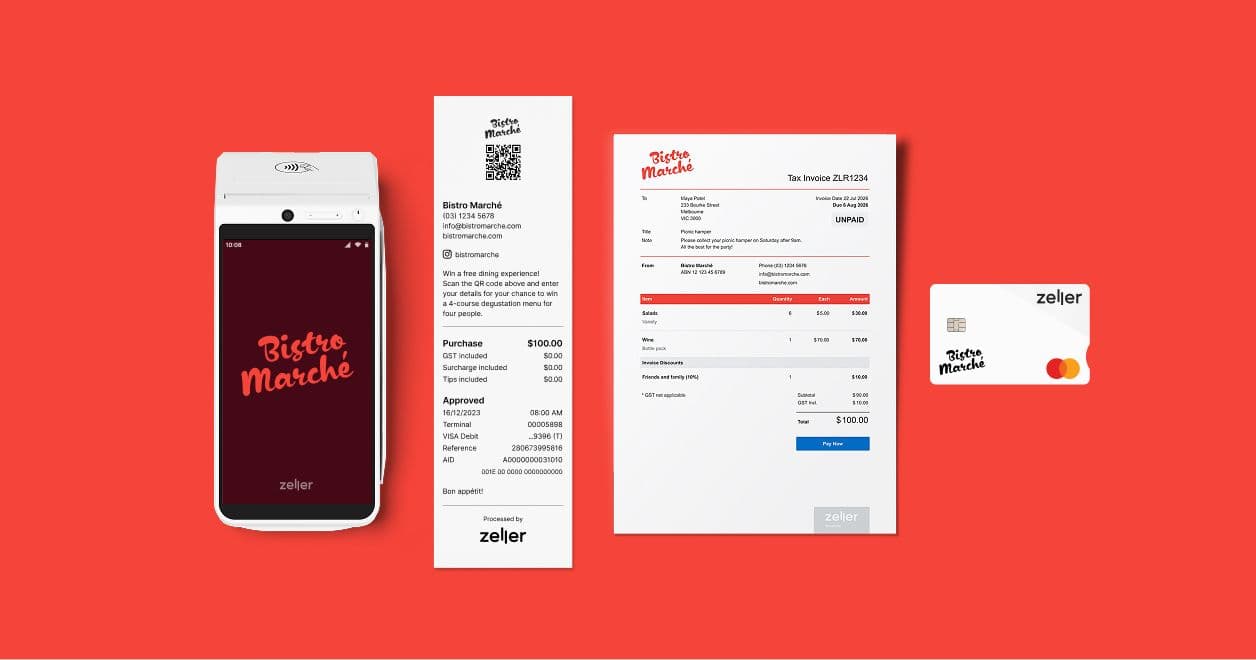
From customising your Zeller Debit Card with a logo to promoting an offer on the screen of Zeller Terminal, or adding a QR code to your receipts: Zeller ensures your brand is central to your payments and finances. A strong brand doesn’t have to mean a big one. Even small businesses are able to derive as much benefit from a recognisable brand identity as major international companies, it’s all a question of scale. The beauty of building your brand as a small business is that you don’t have to go to huge lengths to achieve it. You just have to be consistent. Emphasising your brand at every customer touch point – whether it’s a simple logo printed on your napkins or the colour of your bathrooms – can leave a lasting impression. In this article, we offer you four innovative ways to integrate your brand into the payment process, whether you're selling or buying, to engage customers or vendors with your business. 1. Personalise Zeller Debit Card with your business logo. Regardless of whether you’ve been in business for three years or three days, good branding gives the appearance of being well-established and of higher quality. It’s why adding your logo to your Zeller Business Debit Card or Zeller Corporate Cards is a great way of communicating professionalism to everyone you’re paying. Nothing says “we have our finances in order” like flashing a branded business debit card in front of a supplier. There will be no doubt in anyone’s mind as to the credibility of your business, nor will you ever accidentally pay for a business expense with your personal credit card.  For business owners running multiple venues, being able to visually distinguish each card ensures expenses are paid for with the correct account, reducing reconciliation errors. Similarly, for companies with multiple employees, expense management is made simpler by labelling corporate cards by team or purpose and with a colour to match. All Zeller cards can be created and personalised online in minutes and linked to your chosen Zeller Transaction Account . Virtual cards are ready to use the very same day, and physical cards will be delivered securely via Australia Post to your business address fast.  To add a logo to a Zeller Debit or Corporate Card: Open Zeller Dashboard and navigate to Cards Create a new card and assign a cardholder + linked account Add a card label (optional) Upload your logo Review and create card Find out more about supported specs and dimensions here . 2. Add a custom screensaver to Zeller Terminal. Even when Zeller Terminal goes to sleep, it keeps working for your business. You can set a custom screensaver that will appear on your Terminal screen when it’s not in use. While customers wait for you to scan their items or pull up their order at your point-of-sale, it is the perfect opportunity for you to engage them with your brand. Whether you’ve got a new offer to promote, need to remind customers to place their Christmas orders, or want to highlight a new product or item on the menu: the large, digital screen on Zeller Terminal is the perfect place to do it. Any image can be uploaded, as long as it is sized correctly (320 x 496 px). By incorporating a QR code into the image you can invite customers to sign up to a newsletter, referral program, or competition. This is a great way of bolstering your mailing list with people you know have already interacted with your business. However you choose to use Custom Screensavers on Zeller Terminal, it’s a great way to maintain brand consistency throughout your premises. When you upload a screensaver via Zeller Dashboard, there’s no need to update each Terminal individually, it will automatically update to all the Terminals operating within the site you have selected. By featuring your logo, as well as colours and fonts consistent with your style, a slogan or key message; you will emphasise your brand identity just before your customers walk out the door. To upload a Custom Screensaver: Open the Zeller Dashboard and navigate to Sites Locate and click the site to see its settings Click the Appearance tab Upload your logo Select a background colour (Zeller will automatically recommend some colours based on your logo) Click Save All Zeller Terminals within the site will display the image when in sleep mode 3. Keep customers engaged with branded receipts. Whether they’re printed or sent digitally as an email or SMS , receipts can be used in clever ways to help drive return business or help your customers connect with you. With Zeller, you can add a custom image at the top of the receipt, where a simple logo and/or QR code will catch people’s eye. Below this, you can add in your business details, so your customers know how to contact you, as well as your social media handles. In the case of digital receipts – these are live links that will take customers directly to your social profiles. There are two spaces, above and below the purchase details where you can add a message of 500 characters or less. You could include a brief history of your business, details of a competition you’re running, or a message or slogan that aligns with your brand. Much more than a simple proof of purchase, receipts are an innovative marketing tool that can be leveraged to instil your brand messaging. 4. Align your invoices to your brand identity. You don’t necessarily need a shop front to create a strong brand. Having a clear, identifiable web presence will set you apart from your competitors, and ensure your business is the first that comes to mind when your service is required. Or even when it’s not! Your online presence doesn’t end at your website. Every interaction with your customer is an opportunity to remind them of your brand, and invoices are no exception. Zeller Invoices provides you with the best of both worlds: the ability to create and send invoices quickly, but also the flexibility to customise them to align with your brand. With different colours and layouts to choose from, space for your logo and a custom message, your clients will be able to instantly recognise your business and your service. Not only does this make it easier (and therefore faster) for your clients to pay you, but they’ll associate the service with your brand, and are much more likely to return to you next time. Bringing your brand to life across the payment process is just one of the many ways Zeller lets you tailor your financial solution. With many different ways to take payments, make payments and manage your money, Zeller’s tools are designed with the flexibility and versatility to adapt to your business. Find out for yourself by signing up for a free Zeller Account today or by contacting our Sales Team to learn how Zeller could be a great fit for your business, and your brand.

The Ultimate Guide to Optimising Your Restaurant’s Profit

In an industry where every dollar counts, optimising your restaurant profit margins can mean the difference between feast and famine. Like baking a delicate soufflé, if the conditions aren’t maintained perfectly, you run the risk of ending up with a flop. The key is to find ways to chop your costs and make your revenue more flavourful without compromising quality or the diner experience. Let’s explore some of the most effective strategies to keep your restaurant serving up success for years to come. 1. Upskill for the upsell. Your team plays a huge role in increasing profitability. Proper training helps waitstaff serve diners more efficiently, upsell effectively (without being pushy), and create an experience that encourages repeat visits. Make sure your team knows the menu inside out and can confidently recommend high-margin items to boost sales with minimal effort. But don’t stop there. Host regular tasting sessions so staff can speak authentically about the dishes. Share the story behind ingredients or the chef’s inspiration – people love a narrative, and it can nudge diners toward higher-margin options. Consider introducing friendly competitions between staff around upsells or rewards for top performers. A motivated, informed front-of-house team is one of your most powerful revenue tools. 2. Keep food costs from boiling over. Your cost of goods sold (COGS) is one of the biggest expenses in running a restaurant. Keeping a close eye on things like supplier prices and portion sizes can help you maintain healthy margins. Buying in bulk and focusing on seasonal ingredients can lead to significant cost savings while maintaining quality. Dig into your data and calculate plate costs for every dish. Are you pricing accordingly? Another important aspect is wastage. Waste logs are extra effort, but they're useful for tracking what gets tossed and why, enabling you to tweak your processes to reduce it in the future. Even a 2% reduction in food waste can significantly impact your bottom line. 3. What’s on the menu? Don't think of your menu as just a list of your dishes – see it as a tool designed for maximising your restaurant's profit margin. Menu engineering allows you to prioritise high-margin items, remove dishes that aren’t selling well, and set prices strategically. Place your best-performing items in spots where diners’ eyes naturally go (top-right corner first, then moving to the centre), and consider drink pairings to increase your average order value. Be liberal with provenance descriptors for example the region or farm. Diners love to know where their food has been sourced from, so add detail here to satisfy their curiosity and whet their appetite. Another thing to consider is removing currency symbols. A study conducted at the Culinary Institute of America's St. Andrews Café explored this phenomenon. The researchers found that when menus omitted currency symbols, customers tended to spend more compared to when menus included the dollar sign or the word "dollar." This suggests that a simple typographical change can have a measurable impact on consumer behaviour. 4. Negotiate with your suppliers. Every supplier you work with, from your butcher to your electricity provider, is an opportunity for negotiation. Regularly reviewing your contracts and shopping around for better deals can lead to big cost savings over the course of a year. Even your wine supplier, waste management service, and EFTPOS terminal provider may be open to custom pricing. At Zeller, if your business is processing over $250K per year in card payments, our sales team will work with you to explore a custom solution for your business. 5. Speed up table turnover (without rushing your diners). More diners means more revenue, but the trick is to improve efficiency without making patrons feel hurried. Things like optimising your seating layout (placing bigger tables closer to the kitchen, for example), training staff to repeat orders back to diners to cut down on mistakes, and (if appropriate) reducing wait times with digital ordering can all help to speed up the process. One easy way to improve table turnover is to enable diners to pay at the table. Zeller’s innovative Bill at Table allows customers to settle their bill quickly, split payments effortlessly and tip with ease, making for happier diners, faster table turnover, and, consequently, increased revenue for you. On top of this, Zeller Bill at Table allows you to provide your diners with digital receipts via SMS, email or QR-code, saving you money on receipt paper. And because Bill at Table is exclusive to Zeller Terminal , you’ll pay no monthly rental charges or complicated processing fees to use it – plus you can switch on surcharging to easily pass on the flat 1.4% transaction fee to your diners with zero-cost EFTPOS. 6. Put your money to work. There’s more to maximising profits than cutting costs and selling more stock – your money should also be working for you in the background. With a high-interest savings account like the Zeller Savings Account , you can earn interest on your takings while keeping funds easily accessible for operational expenses. Whether you’re setting aside money for expansion, new equipment, restaurant renovations, emergency repairs or seasonal fluctuations, having a dedicated savings strategy is a smart move that improves restaurant profitability long-term. Another thing to consider is expense management. Zeller Corporate Cards make it easy to monitor spending on things like expansion, new equipment and renovations, helping you stay on budget. With detailed transaction insights and spending controls, you can ensure every dollar is accounted for to keep your operations running smoothly. 7. Consider offering delivery and takeaway. These days, more diners than ever are opting for delivery and takeaway instead of dining in, and if your restaurant doesn’t offer these options, you could be leaving money on the dining table. Expanding your reach through third-party platforms (like UberEats and Deliveroo) or your own in-house system can create an additional revenue stream. Just be sure to factor in delivery costs and adjust your menu pricing accordingly to ensure you maintain profitability. Also consider simplifying your menu for off-premise dining. Not all dishes travel well, so curating a smaller list of top-performers that hold up in transit could be a sensible move. 8. Trim fat from your roster. Optimising staffing is one of the most effective – and most often overlooked – ways to boost profit margins. Use historical sales data to build smarter rosters that match staffing levels to peak demand. Cross-train team members to cover multiple roles, which helps reduce the need for additional hires and improves operational flexibility. This way, you keep service levels high while trimming unnecessary labour costs. Consider using scheduling software that tracks labour-to-revenue ratios and allows for easy forecasting. Communicate clearly with your team about expectations and availability, and foster a culture where efficiency is rewarded, not just clocked hours. 9. Turn one-time diners into regulars. Loyal customers typically spend more and visit more often. Implementing a loyalty program – whether it’s points-based, tiered rewards, or surprise incentives – can drive repeat visits and increase average order values. Also remember many modern POS systems allow for seamless loyalty program integration, making it easy for both staff and diners to participate. Beyond loyalty programs, regular engagement helps. Use email newsletters to share specials, events or behind-the-scenes content. Spotlight staff and regulars on social media and offer birthday perks. Make guests feel like part of your restaurant family. 10. Make your online presence as tasty as your food. Before anyone walks through your doors, they’re likely checking you out online. Make sure your Google My Business profile is accurate, your menu is current, and your website is mobile-friendly. Encourage happy diners to leave positive reviews on Google, TripAdvisor and Facebook, and take the time to respond to feedback. A strong digital presence builds trust and increases foot traffic from first-time visitors. Invest in high-quality photography and video content. Focus on your most photogenic dishes and highlight your restaurant's personality. A great online impression sets the stage for an even better one in person. 11. Serve up some data. Use your POS analytics to understand your best-sellers, identify slow nights, and see where margins are highest. Track which promotions drive traffic and which ones tend to fall flat. Data-driven decisions take the guesswork out of growth. Keep an eye on metrics like table turnover time, average ticket size, and staff productivity. Even reviewing customer feedback over time can reveal patterns worth addressing. 12. Don't just set the table – set the mood. How your restaurant feels impacts how much guests spend – and how likely they are to return. Music, lighting, scent, seating comfort, decor and even acoustics all influence diner psychology. Create an ambience that matches your brand and encourages lingering, indulging and returning. Low-cost updates like mood lighting or seasonal decor can make a big difference. Ambiance doesn’t need to break the bank, but it shouldn’t be an afterthought. The ultimate recipe for tastier profit margins. Maximising your restaurant’s margins requires a strategic approach that balances cost control with revenue growth. By training your staff to upsell, optimising your menu and negotiating with suppliers, you can boost profitability without sacrificing quality. On top of this, finding ways to improve your table turnover and make your money work harder for you – plus potentially adding new revenue streams in the form of delivery or takeaway – can help futureproof your business. Add in a pinch of data, a splash of ambiance, and a generous helping of loyal regulars, and you’ve got a recipe for long-term success.

Let Zeller help you grow your business.

Curated news and content designed for small business owners, delivered to your inbox.

Want to Turn Tables 73% Faster? Introducing Zeller Bill at Table.

Picture this. It’s a busy Friday night and you have a growing line of hungry diners waiting to be seated. You look around the restaurant and can see several tables that have finished their meals and are now trying to catch the eye of a waiter to make the inevitable ‘May we please have the bill?’ gesture. From that point on, a series of steps will typically take place. The waiter will: 1. Head to the POS, print the bill and place it in a billholder 2. Take it to the table for the diners to give it a once over 3. Once the diners have signalled their approval, head back to the POS 4. Return to the table with an EFTPOS machine 5. Process the payment at the table That's five lengthy steps in a best case scenario where the restaurant is already taking payment tableside. If not, it’s even lengthier. This bill-time bottleneck has been slowing table turnover down for years, but thankfully our newest feature Bill at Table is here to change the restaurant payment process for good. What is Bill at Table? Zeller Bill at Table enables you to present your diners with digital, itemised bills displayed on Zeller Terminal's large-format screen, and then accept payment tableside instantly. It helps you to turn tables up to 73% faster from bill request to out-the-door, provide a streamlined diner experience and ultimately increase revenue by seating more tables. Bill at Table works seamlessly with Impos and Tevalis point-of-sale, and makes the checkout process smoother and more rewarding for everyone involved. How does Zeller Bill at Table work? Once enabled, using Bill at Table is simple: Choose a table: On your Zeller Terminal , select the table in your venue from the list. Present the digital bill: Show the itemised bill to your diners on-screen. Process the payment: Diners can pay with their card or mobile device, and even add a tip or split the bill amongst their group. Offer a receipt: If requested, provide the diner with a printed or digital receipt. The diner can also scan the QR code on-screen to download the receipt to their device. This straightforward process combines billing and payment into one step, cutting down wait times and improving the overall experience. What are the benefits of Bill at Table? Bill at Table significantly cuts down the time taken to turn tables at the end of the meal . In fact, restaurants who have implemented Zeller Bill at Table have seen table turnover time slashed by as much as 73% , ultimately enabling them to serve up to three additional tables in every sitting. Take tips tableside with Pay at Table. By using Bill at Table and Pay at Table , patrons are more likely to leave a tip than if they head up to the counter to pay, because as Ben Hickey from The Roosevelt in Potts Point said, “When they get up to pay, the magic is gone”. With the tipping prompt built seamlessly into Zeller Terminal, wait staff don't have to ask the awkward question, ‘Would you like to leave a tip?’ – the system prompts it instead. How to get started with Zeller Bill at Table. Bringing Zeller Bill at Table into your restaurant is easy: Check compatibility: Make sure your venue uses Impos or Tevalis point-of-sale, and that it’s integrated with Zeller. We’ll be bringing Bill at Table to many other POS very soon. If you’d like to see it integrated with yours, please let us know at feedback@myzeller.com Chat with our sales team: They’ll guide you through the steps to getting Bill at Table up and running in your business. Train your staff: Guide your team through the simple process to ensure a smooth implementation. By enabling Bill at Table, your restaurant can improve efficiency and enhance the billing experience for both staff and diners. It’s one of those little things that add up to make a big difference. Say goodbye to frustrated diners and sub-optimal table turnover. Say hello to Zeller Bill at Table.

Here’s a Tip: How Australia Tipped in 2024

There’s no denying the data, Australians are tipping more than ever – even in the face of the ongoing cost of living crisis that’s dominated news headlines for some time now. We analysed EFTPOS tipping data from the 100,000+ Australian businesses using Zeller Terminal last year, and through the findings can see Australia is steadily become a nation of more generous tippers — despite significant cost-of-living pressures. Interesting to note is how electronic payment technology is helping to enable an increased level of gratuity within the local customer service industry. Read on to discover the latest shifts in Australia’s tipping culture, highlighting both geographic and industry-specific trends. Australians are tipping more generously. In 2024, the average tip value increased to $25.20, a dramatic 25% year-over-year (YoY) rise. This growth highlights an increasing willingness among Australians to reward exceptional service, even in a challenging economic environment. Metro areas led the charge while regional tipping declined. Inner-city areas drove tipping culture forward in 2024, while regional areas experienced a decline. Customers in metro areas tipped 26% more on average YoY, while regional areas saw a 10% decrease in average tip values. Tipping frequency on the rise. Australians are not only tipping more generously but also more frequently. The number of transactions including a tip grew by 13% YoY, with dining establishments seeing a notable 12% increase in tipping frequency. Anna-Sophie Pinter, Restaurant Manager at Brisbane's modern Japanese fine-diner NONDA, was impressed with the rise in 2024: "I honestly couldn't have been more surprised given the fact that the rent, food and all other prices just skyrocketed. It’s great to see people appreciating the hospitality we share with every guest who dines with us." Victoria was in a giving state of mind. Victorians emerged as Australia’s most generous tippers in 2024, with an impressive average tip value of $39.50. Queensland followed with an average tip of $32.20, while South Australians tipped an average of $27.80, surpassing New South Wales residents ($16.90) by a significant margin. Notably, South Australians tipped 64% more on average than their New South Wales counterparts. With Sydney being Australia’s most expensive city, it comes as little surprise that New South Welshmen were less willing or able to splash extra cash on tips, but the extent to which was quite dramatic. On average, Sydneysiders tipped 57% less than Melburnians. Adelaide experienced a tipping boom. Adelaide saw a dramatic YoY increase in tipping generosity, with the average tip value surging by an astounding 180%. It’s interesting to speculate on what was behind such a big jump – could the floor staff in SA restaurants really have been 180% more attentive than in 2023 year? Seems like a stretch. In WA, tipping goes west. Despite an average YoY increase of $2.22, Perth’s tipping culture lags markedly behind that of the other major Australian cities, with an average tip of $12.52, sitting about 26% below Sydney’s and roughly 68% behind Melbourne’s. Eat, drink and tip merrily. As in previous years, dining remained the sector where Australians tip most, with a $25.20 average tip and a 12% YoY increase in frequency. This was followed by the beauty sector, which saw an average tip value of $6.90, with the transportation sector not far behind at $5.94. Interestingly, tipping when taking a cab saw a particularly high growth rate last year, increasing in frequency by 25% YoY. As Australia’s tipping culture continues to evolve, these trends suggest a growing appreciation for the hard work that underpins exceptional customer service, even when money is tighter and times are tougher. Alongside Zeller Pay at Table and Zeller Bill at Table, Zeller Terminal 's built-in tipping function, which can be turned on or off with a tap, is one of many easy-to-use features that make it Australia’s best EFTPOS machine.

How to Show Your Customers Some Extra Love This Valentine’s Day

Valentine's Day will be here in a heartbeat, presenting a perfect opportunity to set customers swooning and spending. Last year Australians splashed almost half a billion dollars on their sweethearts, so there’s no doubting Valentine’s Day is big business. Here are several Valentine's Day marketing ideas to capture your customers’ hearts – and dollars – this season of love. _ 1. Packages primed for passion. Curate Valentines-themed gift bundles that combine products into loveable packages ready for romance. A scented candle with that box of chocolate, or a silk eye mask with that matching lingerie set – irresistible. 2. Wrapped with love. Offer a selection of wrapping papers, decorations, and cards to help your customers add a unique, heartfelt touch that their sweetheart will be sure to adore. 3. Free or discounted shipping on Valentine’s orders. Incentivise online shoppers with free or discounted shipping on their Valentine's Day purchases. Make sure to clearly communicate any deadlines to avoid heartbreak! 4. Share the love with local businesses. Collaborate with local businesses to offer joint Valentine's Day promotions, like discounts or Valentine's Day gift bundles. For example, a voucher for 20% off roses from the local florist with every wine purchase over $50, and vice versa. Or a romantic degustation dinner-and-spa package for lovers looking for a special treat. This approach can expand your reach, attract new customers and strengthen community ties. 5. Host a memorable in-store event. Offer couples a unique experience like a one-off workshop, class, or tasting session. For example, a couples' painting workshop where they create a shared masterpiece, a wine and chocolate pairing session featuring goodies from local vendors or a beginner's ballroom or salsa dance class to get hearts racing. Get creative! 6. Provide last-minute gift inspiration. Inspire last-minute shoppers with Valentine’s-themed gift ideas both in-store and online, and make sure to promote them across social and email. By creating dedicated displays or website sections that highlight popular or unique items, you’ll make it easier for those customers who need to make some quick decisions. 7. Include a lovely gift with purchase. Surprise and delight customers by including a small, unexpected gift with their purchase. Whether it's a sample product, a discount voucher for future use or a branded keepsake, little surprises like these can help leave a lasting positive impression. 8. Further sweeten your loyalty program. Show extra appreciation to your loyal customers by offering bonus points or exclusive discounts in the lead up to Valentine’s Day. This not only rewards repeat business but also encourages increased spending and customer retention – what’s not to love about that? At Zeller, we're committed to supporting your business with industry-leading payment and financial solutions to help you succeed. To learn how we can help you make the most of this Valentine's season and beyond, give our local team a call on 1800 935 537 .

Starting a New Business in 2025? Here Are Some Tips to Help You Succeed.

New year’s resolution: finally start that business you’ve been dreaming about. It’s an exciting moment when you decide to finally take the leap, and the beginning of the new year is a classic time for aspiring entrepreneurs, but how to start up a business? With technology advancing rapidly and markets evolving, it's essential to lay the right foundation to set yourself up for success. Here are some practical steps to starting a business and setting it up for success. 1. Research your market deeply. Thoroughly understanding your customers and competition is arguably the most important piece of the business puzzle. Take the time to conduct robust market research to identify demand, pricing trends and gaps in the market that your business can fill. Engage with your target audience early to gather feedback and refine your offerings. Once you’ve done that, the next step is to create a solid business plan . Top tip: Don’t rely solely on the feedback of friends and family. While their encouragement can be crucial during the early stages of your business, it’s important to also get the opinion of people who are truly impartial. 2. Leverage the latest technology. You might be thinking, ‘Well, of course a tech company would say that!’, but it’s true. In 2025, staying competitive means embracing solutions that allow you to maximise output and efficiency. From cloud-based finance software (like a Zeller Account) to cutting-edge AI-powered solutions to e-commerce platforms to next-generation payment solutions (like Zeller Terminal ), in 2025 you have access to more business tech than ever before. Whether you're automating tasks, improving customer experience, utilising real-time analytics – and the list goes on – the right technology will save your business time and money as you grow. Top tip: Start small using tools that align with your needs. You can always scale your tech stack as your business grows. 3. Build a strong, consistent online presence. What’s the first thing you do when you hear about a new restaurant? You Google it, check the reviews, skim the website and make a judgement, all in a few seconds. That’s the same approach many potential customers will take when deciding whether they’re interested in what your business is offering, so you want to make sure your first impression is a good one. There’s a lot more to having a solid online presence than just a good website. From your Google search ranking to Google reviews, wording and design consistency across the various social media platforms and ensuring your business is listed accurately on directories like Google My Business and other industry-specific platforms, every detail plays a role in building trust and visibility online. Building an engaged community on social media can definitely take time, but many businesses find it’s one of their best opportunities to drive revenue – well worth the effort. We’ve written about this previously with a focus on Instagram , but these tips are broadly applicable to all social media platforms. Check them out. Top tip: Provide clear, up-to-date information about your hours, location, and contact details, and consider investing in SEO and content marketing to help customers find your business organically. 4. Plan your finances wisely. As the saying goes, proper preparation prevents poor performance, and nowhere is this truer than when planning the financial side of a new business. Creating a detailed budget that outlines startup costs, ongoing expenses, and revenue projections is paramount. Ensure your business is set up with a financial solution (like Zeller) that combines all of the necessary things you need – like transaction accounts, cards, expense management, invoicing and ways to accept payment – in one convenient place. Top tip: Our Zeller Transaction Account offers far more functionality than a traditional business bank. It’s completely free to open, integrates seamlessly with Xero and you can add unlimited debit cards to your account – plus much more. The best bit? There’s no bank visit, and it only takes a few minutes to open. 5. Find a mentor. Like in almost every other aspect of life, success in starting and growing a business hinges on two seemingly contradictory things – consistency and the ability to adapt to change. You’ve probably heard the phrase “fail fast,” but changing your approach too frequently isn’t ideal either. When you hit a bump in the road, how do you know if you should stay the course or switch gears? You ask someone who has been there before. A good mentor offers guidance, shares valuable insights, and helps you see challenges from a fresh perspective. Their experience can be a compass when navigating unchartered territory, giving you the confidence to make informed decisions. Top tip: While your mentor doesn’t necessarily have to be from the same industry as you, you should seek out someone who has been successful in starting and growing their own business. Learning from their firsthand experience can help you overcome challenges, seize opportunities and navigate the myriad complexities of entrepreneurship. Starting a business this new year? Contact the Zeller Sales Team today on 1800 935 537 to discover how our industry-leading financial solutions can help your business thrive in 2025 and beyond.

3 Tips for Managing Post-Christmas Returns

It’s a new year, and the holiday season is already starting to feel like a fuzzy memory. But for many retailers, Christmas isn’t fully over just yet – because January is the season for returns. With many customers looking for exchanges, refunds, or adjustments to their festive purchases, the challenge is to turn returns into an opportunity to strengthen customer relationships and even boost your revenue. Here are three practical tips to help you manage post-Christmas returns seamlessly. 1. Make store credit that bit sweeter. Entice customers to opt for store credit instead of refunds by offering added perks. For example, consider providing a small bonus for store credit returns, such as an extra 10% on top of their credit total. Not only does this retain the revenue within your business, it increases the likelihood of customers spending more as they’re now closer to either another item or swapping for something with a higher ticket price (and paying the difference). Highlight this option prominently in store and make sure your staff mention it to customers seeking a return. 2. Open up your return window. January is often a very busy month, with many people taking overseas and interstate trips or rushing around getting ready for the new school and work year. By offering an extended return window, you’ll create goodwill and reduce the pressure on your staff to handle returns all at once. Communicate your flexible return policy clearly through your website, email and social media. It’s a good reason to stay fresh in customers’ minds and they’ll appreciate the gesture if they need to use it, helping to make for repeat business and a stronger brand reputation. 3. Use returns to upsell or cross-sell. Remember, every return is an opportunity. Remind your staff to approach returns as a chance to engage with customers to help them find what they need. If someone is returning an item, suggest alternatives, complementary products, or upgrades. For example, if a customer is returning a pair of jeans, offer a different size or colour before simply processing a refund and watching the dollars depart the store. By implementing these strategies, you’ll increase your chances of turning returns into opportunities to drive additional sales and build stronger customer relationships. From returns season to the next Christmas, Zeller is here to help your business all year round. Speak to our expert sales team about how our cutting-edge payments and financial solutions can help your business achieve its goals this new year and beyond.

Top Payment Trends to Watch this Festive Season

The holidays are almost here, and with them comes a big surge in shopping, gifting, and payments. As consumers become ever-increasingly tech savvy, businesses are adopting new trends to enhance the shopping experience. With that in mind, here are five payment trends to keep an eye on this holiday season and into 2025. 1. The takeover of mobile wallets This year, more Aussies than ever will leave their physical wallets at home when they head out to do their Christmas shopping. Consider the following three statistics: In 2022, 30% of in-person card payments were made via mobile devices, up from 10% in 2019. Source: Reserve Bank of Australia Over 15.3 million cards were registered to mobile wallets in 2022, a 760% increase from 2018. Source: Australian Banking Association. A 2022 survey revealed that 69% of Australians felt confident enough using mobile wallets to leave their physical wallets at home. Source: Marqeta If we piece those three stats together, it’s clear to see the shift away from physical cards, and towards mobile wallet payments, is continuing to pick up speed. Make sure your business is set up for seamless electronic payment acceptance, whether your customers are tapping with their card or mobile wallet.  Zeller Terminal  equips your business to accept physical cards as well as mobile payments via smartphones and smartwatches. 2. Selling via social From Instagram and TikTok offering in-app shopping experiences to businesses selling solely via Facebook Marketplace and Instagram DMs, social platforms have become key places for payments to take place. Payment Links , which are built right into Zeller Virtual Terminal , are perfect for  businesses selling on social media. This handy tool lets you easily generate a secure, clickable payment link that you can simply send to your customers in a DM. We’ve seen many innovative artisan businesses utilising Payment Links to sell quickly and easily via social media, without the need for a permanent, e-commerce enabled website. Instagram or Facebook Marketplace + Payment Links will help set you up for success, too. 3. Enhanced fraud protection They might call it the silly season, but with the sophistication of fraudsters these days, you don’t have to be silly to be scammed this Christmas. Thankfully, the payments world is fighting back with advanced fraud detection tools, including AI-powered analytics and biometric authentication. For shoppers, this means increased protection of their funds, and for businesses it means fewer chargebacks and losses. Learn more about how Zeller keeps you and your customers safe here . 4. Accepting payments via Tap to Pay Turning a smartphone into a payment terminal can be a game-changer for small businesses. Tap to Pay works on selected iPhone and Android smartphones, making it super simple to take payments wherever you are with just a mobile app, or even to use as a second EFTPOS machine when things get busy. While Tap to Pay is still an emerging innovation in payments, we’re already seeing many mobile businesses adopt it as a way to accept payments in lieu of sending online invoices or carrying an EFTPOS terminal with them at all times. 5. The inexorable rise of self-checkout As we move into 2025 and beyond, expect to see more self-service kiosks, from fast food restaurants through to airports, department stores, supermarkets, universities… you name it. Couple this with QR codes on pub tables and cafe menus, one thing is clear – love it or hate it, self-checkout is only going to become increasingly common. With advancements in self-checkout technology making it easier for smaller businesses to set up a kiosk too, we’re looking forward to seeing this innovative new technology in a wider variety of scenarios. If you’d like some expert advice on setting up your business with the right payment and POS solutions for this festive season and beyond, speak to the Zeller Sales team .

7 Ways to Support Your Last-Minute Christmas Shoppers

Christmas is crunch time. Before your customers start racing to buy gifts for friends and family or picking up their festive essentials, you’ll want to be certain your business is set up to simultaneously maximise their last-minute shopping experience – and your profits. With that said, here are seven tips to help ensure this Christmas brings good cheer to your business and your customers. 1. Extend your trading hours into the O Holy Night. Longer trading hours make things a lot easier for shoppers with packed schedules. Promote your extended trading hours via store signage, social media and email, so customers know you're there when they need you. Consider offering special ‘late-night exclusives’ or ‘last-minute discounts’ to encourage foot traffic during these extra hours. Top tip: Most promotional emails go unopened, so make sure your subject line gets the ‘extended hours’ message across without any additional clicks required. 2. Offer shipping that’s swifter than Santa. Make life easier for online shoppers by offering discounted express shipping, and make sure to clearly display cutoff dates for guaranteed Christmas delivery. Highlight gift-ready products that are eligible for expedited shipping to further simplify the shopping journey. Also keep in mind that Australia Post also advises their own Christmas delivery cut-off dates , so be sure yours are aligned with theirs to avoid any risk of delayed orders. 3. Gift wrapping, all wrapped up. Save customers time and hassle by offering gift-wrapping services. Free or paid, it’s a thoughtful touch they’re sure to appreciate, especially if they’re not much chop at wrapping gifts. Better yet, add extra flair by using festively branded wrapping paper. For example, a Santa hat hanging off your logo could be a good design thoughtstarter. Top tip: If you’re using Zeller POS Lite to sell Christmas gifts this holiday season, add ‘gift wrapping’ as a modifier so you can track how frequently customers request it. You can learn how to apply modifiers to a cart here . 4. More merry helpers. The Christmas rush can be overwhelming, so ensure you have enough staff to manage the extra foot traffic and handle queries efficiently. Make sure your team members are up to speed and across any new processes to ensure peak service during peak season. A little extra training can go a long way. 5. Deck the halls of your website. An easy-to-navigate, festively decorated site will draw in time-crunched buyers. Adding a ‘Last-Minute’ section or countdown banners can create urgency and attract shoppers looking for quick solutions. Top tip: A curated gift guide on your website can be a neat idea, but if it’s too tricky to pull off in time simply create a PDF version to email to customers. It’s a great way to build and drive engagement from your subscriber list, too. 6. Many happy returns. Ease customers' hesitation with a flexible return policy. It’s a simple way to encourage impulse purchases. Promote this benefit in store and on your website (and perhaps via email or social media too) to reassure shoppers that buying now doesn’t mean risking regret later. You can also add your flexible return policy to your receipt printed, emailed, or sent via SMS from Zeller Terminal too — learn how to do that here . 7. Sleigh the essentials. Make sure you’re stocked up stocking stuffers, greeting cards, wrapping, and any other items that make easy and essential add-ons at the checkout. Consider bundling these items into ready-to-go holiday kits for added convenience. By putting these strategies into play, you’ll not only provide your customers with a seamless, thoughtful shopping experience, but also give yourself the best chance to boost your holiday sales. If you’d like to learn more about payments and POS solutions to make spirits bright this Christmas, give our local team a call on 1800 935 537 and we’ll be happy to help.

How to Start a Food Truck Business in Australia

The local food industry has seen remarkable growth, with food trucks becoming a vibrant part of the culinary landscape. Over 5,000 food trucks are operating across Australia, and this number continues to rise. But why choose a food truck over opening a traditional brick-and-mortar restaurant? In today’s economy, the answer is simple: affordability. For aspiring entrepreneurs, a food truck offers an exciting, cost-effective way to open a hospitality business, without the heavy financial burden of a full-scale restaurant. In an era of minimalism and innovation, food trucks perfectly align with modern trends — compact spaces, thoughtfully curated menus, and a chance to build a loyal fan base. If you're ready to embark on this exciting venture, here are a few considerations before launching your own food truck business in Australia. Do thorough research. Firstly, what is a food truck? A food truck is a large vehicle from which food can be made and sold. The classic ice cream van has evolved into a culinary experience on wheels. Food truck culture is thriving in Australia, but with popularity comes competition. Whether you're thinking of opening a taco truck or serving cheesecake on a stick, chances are your idea may already exist. This works to your advantage — there’s a proven demand for street food. The key is serving your diners in a way that sets you apart. Understand the market and your potential customer base, explore the latest food trends in your area “Food trucks near me”, and identify a niche that resonates with your passion — vegan fare, fusion cuisine, or artisanal desserts. Gauge the competition and customer preference. This research will help you craft a unique and appealing concept to customers. Once you sort your offering, you also need to think about other aspects of the business — truck, suppliers, vendors, and cost. Building your food truck business plan. Factor in a killer menu, target market, raw costs for food and suppliers, permits, and marketing to create a business plan — you can also follow our business plan template here . This plan guides your operations and demonstrates a clear vision to investors or banks when you apply for a business loan or financing. Include elements like an executive summary, market valuation, goals and objectives, risk assessments and financial projections (for at least two to three years), compliance and legal requirements. The more detail you include, the safer your plan will be. You can also add ideas for menus, or design considerations for your food truck’s interior. Applying for licences and permits. The licences and permits required to run a food truck in Australia can be complex, so it’s important to understand what you need before embarking on your venture. Permits may be required for parking, while health and food conduct certifications are necessary to ensure your food truck is operating legally. These requirements may vary in different state or local governments, so be sure to check both. You also need to consider business registration requirements such as securing your ABN , truck safety regulations, vendor licences, and insurance amongst other things. Getting in touch with your local council is also a good idea, to help you stay up to date with any changing regulations in your area. Purchasing or renting a food truck. Now that your business plan is ready, and you have a grasp of all the rules and regulations — it's time to purchase or rent a food truck. Both options come with advantages and challenges, and there is no right or wrong answer. It all comes down to your financial situation, long-term goals, and business strategy. If your budget allows, buying a food truck offers you complete ownership, and the freedom to modify the interior, kitchen and layout to suit your business aspirations. However, if your budget doesn't allow for this type of investment, renting a food truck allows you the flexibility to start your business journey without as significant a financial commitment. You can still focus on the quality of service and delivering an amazing and unique food experience. Renting can provide you greater financial flexibility to spend on the necessities, such as equipment and marketing — both of which are critical when you’re stepping into a competitive market. Building your food truck brand. Your food truck is a mobile reflection of your brand. Its design, colours, fonts and overall aesthetic embody your business identity and help to build a connection with your target audience. Whether it’s a taco truck or a dessert stand, your food truck’s look should align with the type of food you offer, and create a cohesive experience for your diners. Ensure that your branding is reflected consistently across your social media, website, menu, receipts, and the truck itself too. Location is just as important as design. Parking in highly trafficked locations like events, street festivals, markets, or busy CBD locations (surrounded by offices) will help you capture the attention of new diners, and establish your brand. Finding the right location is also a branding and marketing strategy, as it will allow you to align yourself with your target demographic. Rotating between popular locations and promoting your next “stop-off” on social media can also help to drive demand. Choosing your point-of-sale and payments. Running a food truck also requires a mobile POS (point-of-sale) and payments system that adapts to a small, fast-paced footprint. That's where Zeller comes in — offering an all-in-one payments and POS terminal that enables you to build a menu, add modifiers, customise orders, and accept payments from a handheld device. Ready to learn how Zeller can help your food truck business? Speak to our local team today to help you get set up with Zeller Terminal, at the best possible price.

Best Apps for Tradies: Essential Tech for Your Toolbox

Supercharge your workflow with these must-have apps for tradies to organise projects, track expenses, accept payments, and manage teams. Whether you're a sole trader or a growing business, these apps will transform your day-to-day operations and help you focus on what matters most – getting the job done. With so many apps for tradies out there, choosing the right one that simplifies everyday tasks and improves productivity may seem overwhelming. Read on to discover our pick of the best apps for tradies available in Australia today. Apps for tradies to manage jobs, projects, and workflows. AroFlo AroFlo is a go-to job management software for tradies on the move, besides managing complex jobs and tracking costs it also simplifies — scheduling, inventory management, property asset data, projects, reporting, quoting, and even hiring subcontractors. It streamlines workflow, so you can efficiently manage and schedule projects every step of the way. SimPRO SimPRO offers complete control over your jobs and projects by tracking inventory, project timeline, and workflow. Its project time tracking feature makes monitoring time spent on projects easy for accurate cost estimates while its financial tool ensures you stay on top of expenses. SimPRO handles everything from admin and team management to communications and cash flow, allowing you to generate quotes and manage inventory seamlessly for even the most complex projects. Tradify Tradify is a business management software designed for sole traders to manage every step of the job from start to finish — all in one place. It allows you to track time, organise schedules, and send online quotes to clients, streamlining the entire process while giving you the freedom to schedule, book, and delegate tasks. Fergus Built by a tradie (for tradies) with insights into the challenges of running a trade business, Fergus was designed to deal with complex projects, allowing you to plan and organise tasks and schedule multiple jobs simultaneously. From monitoring labour to tracking material costs, Fergus is an app that helps keep your whole business organised. Apps for tradies to find jobs and contractors. hipages Acting as a comprehensive hub for job opportunities, hipages offers tradies a chance to expand their network, secure additional work, and engage with clients or subcontractors, all without the hassle of administrative tasks. Whether you're a plumber, carpenter, or painter, the platform allows you to advertise your services and manage job postings seamlessly. Think of it as the Tinder of the trade industry — matching skilled tradies with those in need of their expertise. Oneflare by Airtasker Oneflare , powered by Airtasker, is a platform for tradies to grow their client base and find new job opportunities. Various customers post job requests, which allows tradies to choose projects that fit their schedule and expertise. The platform not only connects tradies with potential clients but also helps them build a trusted reputation through reviews and recommendations. ServiceSeeking A platform for tradies to showcase their skills, find new jobs, and grow their business, ServiceSeeking lets tradies easily browse and bid on jobs that match their expertise. A quoting system ensures they stay competitive with their bids and with its strong review system, tradies can build a solid reputation and secure more work. Apps for tradies to manage payments, and finances. Zeller Zeller is an all-in-one payments and financial management app that enables you to track your cash flow from beginning to end. From Zeller’s mobile app, you can accept card payments on the spot with Tap to Pay, manage money stored or saved in your Zeller Transaction Accounts, pay for expenses using a virtual debit card, and keep track of all your incoming and outgoing transactions. You can also monitor the status of invoices or payment links you have sent to clients through the Zeller Dashboard on your laptop or desktop computer, too. Xero An easy-to-use cloud-based accounting software, Xero is designed for small businesses and sole traders. With features like payroll, expense tracking, invoice management, and daily account management Xero will help you minimise reconciliation errors and track your cash flow. Xero simplifies financial management for tradies looking for a comprehensive accounting system. Xero also makes reconciliation easier with a simple, one-click integration with Zeller. Grow your business with Zeller. Zeller elevates your business with an all-in-one payments and financial management solution. Seamlessly integrating with Xero, Zeller ensures all your transactions — from invoicing to expenses — are tracked in one convenient online account.

What Is Visual Merchandising? 8 Tips for Retail Businesses

Visual merchandising means creating engaging displays — physically and digitally — to grab customers’ attention and drive sales. It includes strategically placing products, signage, and decor to elevate the customer experience. Leveraging visual merchandising creates experiences that resonate with customers. Consider it your silent salesperson — gently nudging clients to browse, engage, and ultimately make a purchase. Swedish home goods mega-retailer IKEA is a real-world example of visual merchandising in action. IKEA uses visual merchandising to create an immersive shopping experience by letting customers leisurely walk through curated spaces — from kitchens to bathrooms and bedrooms. Customers see and imagine their homes in these furnished rooms and living areas, which motivates them to purchase. This approach applies to various industries, such as retail, food and beverage, grocery, and automotive. While large retailers like IKEA can invest heavily in visual merchandising, small businesses can still achieve results, even with a modest budget. Below we offer eight strategies for retail business owners that are easy to implement. Christian Kimber 1. Engage your audience with customer-centric displays. Your displays should speak directly to your target audience. Knowing what your customer values — affordability, luxury, or fun — will help you design engaging and relevant displays. Australian menswear designer, Christian Kimber is a great example of how small retail businesses can focus on their customer needs, “We sell confidence, we don't sell products," says Christian who has purposefully designed the layout of his stores to resemble a dressing room more than a shop. Customers are immediately put at ease and are made to feel comfortable trying on clothing for as long as they need – as if in their own bedroom. 2. Capture attention with seasonal, holiday, and event displays. Seasonal sales spikes for small retail businesses are frequently caused by timed product placements and themed in-store decor. Whether it's summer or winter, Mother's Day, or Valentine's Day, coordinating your store's displays to a holiday or event attracts customers and highlights merchandise. Creative, holiday-themed merchandising not only attracts shoppers but also enhances brand appeal. 3. Appeal to all the senses. Visual merchandising extends beyond what meets the eye. Sensory branding — sight, sound, touch, smell, and taste — creates a deeper, more engaging retail experience. For example, using scents that stir up memories and emotions, soothing music to relax customers, and lighting and colour schemes to direct attention to new arrivals and shapes to form familiarity with the store. These sensory triggers enhance the customer’s emotional connection to your brand and boost sales. Bill’s Farm 4. Ensure safety and functionality. Displays should be safe, convey messaging, and be visually appealing. For example, a shoe store needs strong shelves that are both easy to reach and ensure the product won't fall off. Discount signage needs to be placed in prominent places that draw attention. 5. Stack it high. Well-stocked shelves not only create an inviting shopping atmosphere but also give the impression that the business is thriving, resulting in a boost of customer confidence and encouraging sales. Walking into a store with half-empty shelves, on the other hand, can signal disorganisation or lack of inventory. However, this doesn’t mean overstocking is the solution. Balancing full shelves with strategically placed discounts or offers can attract customers while reinforcing a strong, positive brand image. It also helps when products are at eye level or slightly above, making it easier for customers to interact with the items and increasing the likelihood of a sale. 6. Stay up-to-date with trends. Using interactive displays and keeping up with emerging trends is a great way to increase engagement. A boutique store, for instance, might offer monochromatic displays to mirror current design trends or use touchscreens to present online collections. 7. Test and refine your merchandising approach. Testing various arrangements, lighting configurations, and product placements frequently is necessary for successful visual merchandising. Finding what works best for your particular audience and area is aided by an ongoing process. 8. Maintain brand consistency. Everything in your store should have a unified concept that represents your brand, from decor to documents, everything should maintain a consistent theme. This extends to even the smallest details, such as napkins, signage, and even the EFTPOS machine : anything that can leave a lasting impression on your customers. Take visual merchandising to the checkout with Zeller Every interaction with your customer — whether digital or in person — is an opportunity to establish a brand presence, and payments are no exception. With Zeller, you can enhance visual merchandising best practices by ensuring that your brand identity is reflected across all interactions, from payment processing to receipts, and invoices. Taking your visual merchandising guidelines to the checkout, Zeller Terminal enables you to add your brand with customisable screensavers and choose the perfect hardware colour to complement your retail store’s design and aesthetic. Take your visual merchandising best practices even further and discover how to boost your brand presence with Zeller in this article here .

What is a SKU? The Complete Guide to Stock-keeping Units

A stock-keeping unit (SKU) is a set of alphanumeric digits, usually eight to ten characters, that retailers use for tracking inventory. SKUs enable businesses to label items with a code to identify and efficiently track products and stock levels in their  point-of-sale system . A SKU usually consists of the item name, product information (colour/size), and manufacturer details or identifier number, for example, TSH-PNK-MED-001 (T-shirt, pink, medium, identifier number). These codes can either be created manually or automatically generated via your POS system. Ultimately, SKUs allow you to keep track of how many items you have sold and how many are remaining either on-premises or online, to avoid overstocking or stock-outs. SKUs and inventory management SKUs help organise stock by uniquely identifying each product, making it easier to track and monitor inventory. Businesses can track product amounts and find their exact location. This location can be in a warehouse, store, or sold. This enables accurate stock tracking, helping identify best sellers or overstocked items for better inventory decisions. In inventory management, SKUs are crucially important. They help automate restocking when stock levels get low. This ensures good stock control and prevents shortages. This integration allows businesses to streamline operations and improve decision-making. What is the difference between a SKU and a barcode? A barcode is made up of a 12-digit number known as a universal product code (UPC) which is assigned to products when it is manufactured. While both barcodes and SKUs are designed to identify products, they are used in different contexts. For example, let’s say a manufacturer produces a variety of shampoos under the same brand. The manufacturer would use a barcode (UPC) to track how many bottles of each shampoo are shipped to retailers. On the other hand, the retailers would create SKUs for those bottles of shampoo to manage their stock. For instance, a retailer might create different SKUs for the same brand's shampoo based on specific attributes such as size, variant, or scent to track how many units of each type are sold or in stock. Example: Brand : Shirley’s Shampoo Category : Shampoo (SH) Variant : Anti-dandruff (AD), Moisturising (MO), or Volumising (VL) Size : 250ml or 500ml Store Code : Store A (STA) So, the retailer's SKU for a 250ml bottle of Shirley’s Anti-Dandruff Shampoo might look like — SH-AD-250-STA. Meanwhile, the 500ml bottle of Shirley’s Moisturising Shampoo version could be — SH-MO-500-STA. This allows the retailer to track different sizes and variants of the same shampoo brand effectively in their POS system. The following table below details the differences between a stock-keeping unit and a universal product code. How to create and manage SKUs While there are two simple ways to create SKUs — either manually in a spreadsheet or automatically through a SKU generator   — there are several effective strategies to manage them. Description and consistency Ensure a clear and consistent SKU description that is easily understandable. The format could be either short or long, but it needs to be easily understood and categorised accordingly. Use simple abbreviations such as ‘BEV’ for beverage, ‘CON’ for confectionery, ‘APP’ for apparel, for example. Training and updates Regular updates and reviews are required to keep SKUs consistent and comprehensible. Your staff also need to be trained in the SKU management process to avoid errors and misunderstandings. Scalability While writing SKUs may seem like something you can figure out on the go; a strategy and careful planning are required to create a system that is scalable. It’s important to create a SKU system that will grow with your business, so be sure to consider future inventory when building your library. SKUs made simple with Zeller POS Lite Manually categorising items and managing SKUs can be tedious and time-consuming, which is why it pays to have a POS system to simplify the process. Zeller POS Lite is a user-friendly point-of-sale system, built-in to Zeller Terminal 2, which allows retailers to quickly create and manage a SKU system — affordably. Whether you’re setting up from scratch or migrating from an existing POS, Zeller POS Lite simplifies the process of building an item library with images, descriptions, prices, and categories. You can upload an item list in CSV format, or create one directly on the terminal or via Zeller Dashboard. Plus, all changes are synced in real-time, ensuring your SKU system is always up-to-date.

Digital Marketing: Six Tips from a Small Business Mentor

When you’re a small business owner running operations, managing accounts, hiring staff, and juggling customer service, it’s understandable that marketing can sometimes fall by the wayside. But neglecting it can cost you customers. We spoke with digital marketing expert and small business mentor, Amy Treacy , to uncover the simple yet essential steps to enhance your online presence and get more customers through the door. If there was one thing Amy Treacy could tell all small business owners when it comes to improving their digital marketing, it would be this: focus on the basics. “My whole business is about helping people get the basics right. There's no point racing off and doing Google Ads, if your website looks terrible or it doesn’t work properly, or if your phone number is listed incorrectly,” she explains. “The most common mistake I see is small business owners not optimising the platforms they have, and not using those that are cheap or free… They assume marketing is expensive, or involves really high level tech talk,” she continues. “Sometimes all it takes is a few simple steps to greatly improve your online presence.” So, what are these steps? 1. Use the tools you already have. Rather than adding more social media platforms or marketing tools to your arsenal, Amy’s first piece of advice is to optimise what you’ve already got: “Look at your current tech stack. Subscriptions can get out of control and often people feel overwhelmed because they've got that many logins and this doesn't connect with that. Not to mention, if they’re paid subscriptions it can cost them a lot of money. Take a breath, understand what you want to do. What you can get rid of. What you can simplify. Then go from there,” she says. A lot of the time, the platforms you’re already using offer the same functionality that you’re looking for elsewhere… It’s important to use all the features and functions that the platforms build in for you,” she explains. “For example, a lot of people don’t realise that you can add your location on Facebook and Instagram. This simple action sends a signal to those platforms of where you are located in the world, so then they'll show your posts to people. Similarly, business owners should be encouraging customers to leave a review on their Google Business Profile – it can have a huge impact on how they rank on Google.” 2. Secure your social media accounts. “A lot of businesses are very reliant on Facebook and Instagram, but what they don’t realise is that they can lose those profiles at the drop of a hat if they are hacked. It’s like putting all your eggs in one basket,” explains Amy. “Many small businesses haven’t yet invested in a website or an e-mail marketing system, but if they lose their Facebook account, they would have no way of contacting their customer base. They would have to start from zero, and a lot of businesses wouldn't be able to withstand that,” she says. It’s therefore essential to secure your accounts to mitigate the risk of being hacked. “It can be as simple as setting up a password management system and two factor authentication, but you also should make sure your Meta Business Account is set up properly as this is where I see a lot of problems arise.” 3. Get a Google Business profile. “Nowadays, we use Google for everything. If you’re looking for a coffee shop, you type 'coffee shop' into Google Maps. It’s the first place people go,” says Amy, “So, if you’re not there, you’re nowhere,” she continues. Having a Google Business Profile is a great, free way for businesses to maintain an online presence, especially if they can’t afford a website. “Plus it actually doesn’t take much work each month,” says Amy, “Once it's set up, it's pretty much self-sufficient.” What’s more, if you don’t have a website, a Google Business Profile can be a great way to help customers find what they’re looking for and reduce customer service enquiries: “There's a little feature called ‘questions and answers’,” says Amy, “Put your frequently asked questions in there. Not only will they be loaded with keywords, which will help improve your ranking on Google, but they will also help your customers find what they need without having to ring you.” 4. Invest in a website and show yourself on it. “A website doesn’t have to cost you $20,000. There are so many cheaper options,” says Amy, “But even the smallest businesses can benefit from having a website, just for that trust factor. That online presence helps people to know that you’re not a scam, and for SEO [search engine optimisation] it’s also so important,” she explains. Once you have a website set up, the next most important step is to explain what your business is about and why someone should buy from you. “One of the biggest mistakes I see is websites not having any call to action, no storytelling, nothing to convince me why I should buy from this business rather than finding a similar item at Kmart,” says Amy. “We're social animals and we want to connect with other people. That actually drives purchasing decisions. People want to know your backstory, the reasons why you're in business, all of those things can be easily shared on your website. They’re what make you memorable,” she explains. “Among my clients, the “About Us’ page is usually the second most visited page after the homepage,” says Amy. “Make sure you’ve got a photo of yourself on there and don’t forget to say where your business is based.” 5. Access your web and social media analytics and create a strategy. “No one likes the word strategy,” says Amy, “but it doesn’t have to be 10 pages long or set in stone, you just need to have a goal. It could be as simple as saying ‘this year, I want to make X number of sales on Fathers Day’,” she explains. “From there, it’s just about working backwards with whatever you’re capable of and whatever you’ve already got set up.” Most business platforms – whether it’s your website, social media page, or Google Business Profile – will allow you to access the data and analytics of your page. These metrics, such as the number of clicks, the number of page views, or the number of likes, are key to understanding whether your strategy is working or not. “You don't need to take note of every single metric,” says Amy, “Just pick the most important ones, then decide what you want to improve first,” she explains. “After a period of time, you can go back and see if you’ve made a difference.” You can also use these metrics to identify trends. “If your Facebook page has ticked along and all of a sudden we see a big spike in engagement, look into what you did that day and replicate it,” says Amy. 6. Keep learning and outsource when necessary. “If something scares you, don’t just put your head in the sand,” says Amy. “Whether it’s Facebook, Instagram, or Google Business Profile, don’t assume you’re fine without it. Just keep learning,” she continues. While it might seem daunting at the beginning, these platforms do not require expert knowledge to use, and the benefits to your business will be considerable. “Business owners run for the hills when I mention SEO,” says Amy, “but it’s not as complicated as many may think.” SEO, the process of improving your website’s visibility in search engine results, simply comes down to sending the right signals to Google, so that it can help users find your business. “Adding information to your website, and optimising your Google Business Profile and social media can have a significant impact on where you rank in search results,” explains Amy, “It's not something you necessarily need to pay an agency for - some things you can certainly DIY.” Where you should outsource work is when it does indeed require expertise that you don’t have. “Don’t create your own logo if you don’t have any experience in design,” says Amy. “You can waste hours and hours and end up with a very amateur-looking logo which will be pixelated when you have to print it on a banner. Pay someone to do it. Engage an expert. The same applies to a bookkeeper or an insurance broker. Anyone who can take that load off,” she explains. Need a helping hand? If you’re a small business owner needing some extra support, be sure to check out the  Digital Solutions Program  which offers subsidised 1:1 mentoring, workshops, and courses on everything from social media, to SEO, web design, cybersecurity, and more. If you’re based regionally, join the free  Bush Biz Owners of Australia  Facebook group, where business owners can share, connect, and learn from one another or reach out to Amy via her website, Bush Biz Boost .

Let Zeller help you grow your business.

Curated news and content designed for small business owners, delivered to your inbox.
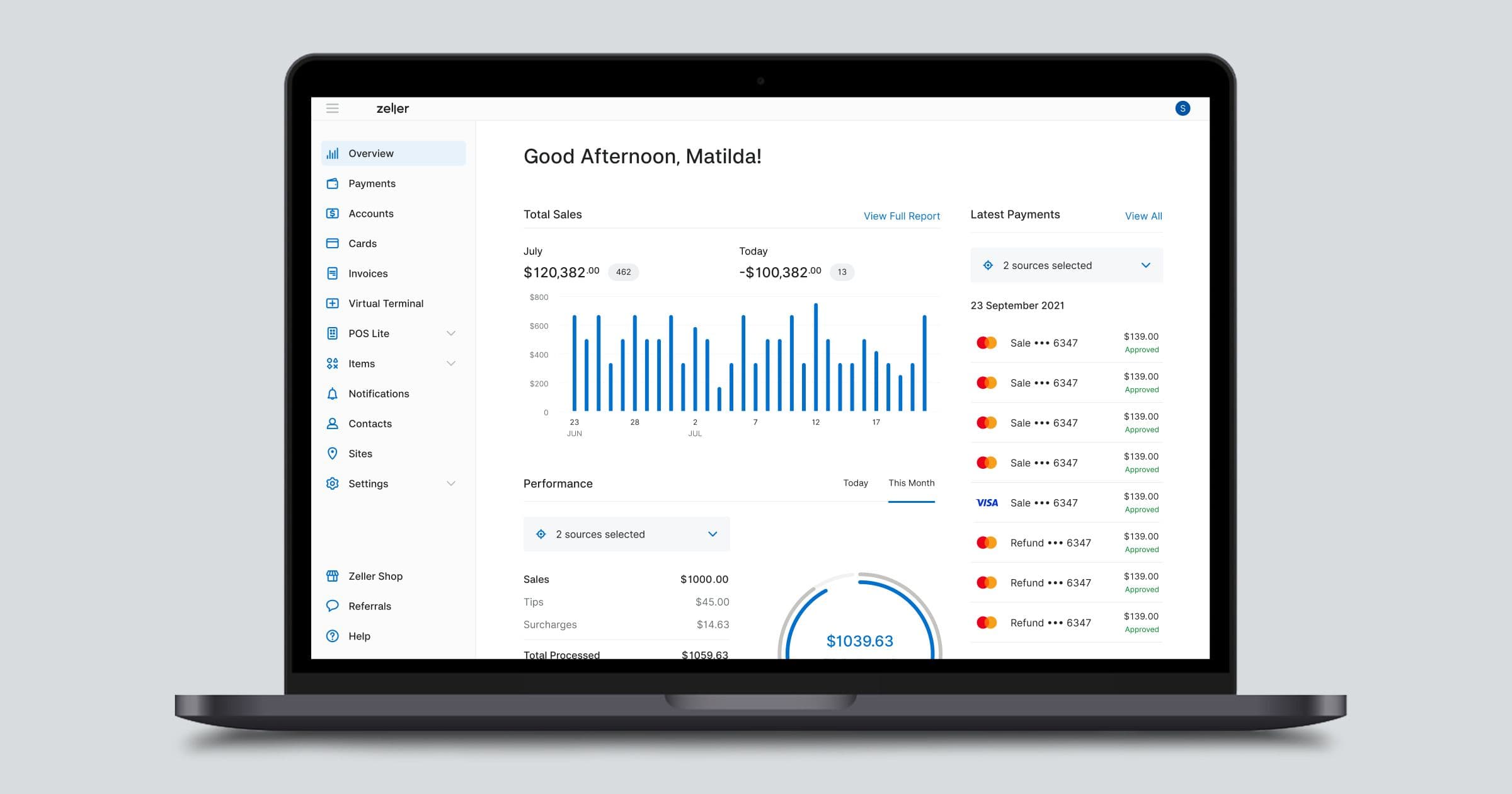
3G Shutdown: What Business Owners Need to Know

Australia’s 3G network is being switched off at the end of October. While this transition ultimately means greater connectivity and efficiency, it requires business owners to upgrade their EFTPOS technology ahead of the 3G shutdown to ensure minimal disruption to their operations. Read on to learn what’s changing, how you may be affected, and what steps to take. Why is Australia’s 3G network being shut down? While 3G was once the backbone of mobile coverage across Australia, modern devices are becoming increasingly dependent on faster 4G and 5G networks. As a result, Australia’s mobile network operators – namely Telstra, Optus and TPG Telecom/Vodafone – are having to dedicate a large portion of their network to a service that isn’t being used and will only become more redundant. By shutting down the 3G network, the providers will be able to enhance the capacity, speed, and reliability of their 4G and 5G services. What is the difference between 3G, 4G, and 5G? The difference between 3G, 4G, and 5G lies in their data speeds and capabilities, with each generation offering faster speeds and better performance than the previous one. 3G was introduced in 2001 and offered a major leap in cellular technology with speeds up to 7 Mbps, which enabled basic music and video streaming. By 2009, 4G brought even faster speeds, ranging from 5 to 100 Mbps, allowing for HD video streaming, mobile hotspots, and more responsive real-time applications like video calls. The latest advancement, 5G, offers ultra-high-speed data transfer and improved performance in crowded areas, supporting 8K video streaming and rapid downloads. As 5G deployment continues, it's set to become the dominant cellular technology, providing even faster and more reliable connectivity. When is the 3G shutdown happening? TPG Telecom/Vodafone has already switched off its 3G network Telstra will switch off its 3G network on 28 October 2024 Optus will switch off its 3G network on 28 October 2024 What devices will be affected by the 3G shutdown? Any device that is reliant on the 3G network – such as phones, EFTPOS machines, cars, tablets, and security cameras – will stop working after the shutdown. All EFTPOS machines need a stable internet connection in order to accept payments. Many older and outdated EFTPOS machines from incumbent providers such as the big-4 banks (Commbank, NAB, ANZ or Westpac) as well as Tyro, are locked to the 3G network, and won't automatically switch over to 4G. The easiest way to find out whether a device you have is going to be affected by the shutdown is to contact the manufacturer or the provider. If you are a Zeller Customer, rest-assured, all our  EFTPOS terminals  are compatible with the 4G and 5G networks. My EFTPOS machine relies on 3G – what should I do? Contact your payment provider. To ensure your EFTPOS machine won’t lose connectivity when the 3G network gets switched off, contact your financial services provider and ask them. They will likely ask you for specific information about the model of machine you are using, so make sure to have your hardware and any documentation close by before picking up the phone. Have back-up hardware on hand. If your EFTPOS terminal is locked to 3G or you're concerned about getting an upgrade in time, it’s a great idea to have a back-up method to accept payments.  Tap to Pay with Zeller App  is a great, affordable way to accept payments without an EFTPOS terminal. Simply download Zeller App on your smartphone, and accept card and mobile wallet payments directly on your mobile device. Just make sure that your smartphone is 4G enabled too! Switch to WiFi or Ethernet. Most EFTPOS solutions provide various connectivity options beyond just  SIM cards , including the ability to default to Wi-Fi or connect via an Ethernet dock. This ensures a stable and reliable connection that doesn't rely on mobile or cellular networks. Avoid interruptions: switch to Zeller. Zeller is a modern financial services provider offering next-generation EFTPOS hardware to Australian businesses. By switching to Zeller, not only are you safeguarding your business during the 3G shutdown, you are also preparing your business for the future with the latest ever-evolving technology.

Shop Small: Six Tips to Boost Your Revenue this August

American Express’ Shop Small is back encouraging shoppers to support local business. Read on to learn how you can get involved and how you can capitalise on the momentum. While it’s been a tough few years for traders with record-high inflation off the back of a global pandemic, there is some good news: the movement to support local bricks-and-mortar businesses has gained significant momentum. A 2021 study even showed that  more than eight in ten Australians intended to shop locally in the future . With this renewed sense of community, it’s an important time to be emphasising the benefits of shopping locally. Leading the charge is  Shop Small , an Australia-wide celebration of local businesses, spearheaded by American Express. The initiative encourages shoppers to choose locally-owned stores over large chain retailers by giving them an added incentive to spend at small businesses. Read on to learn six ways to support the movement by helping get more customers through the door and enhancing their experience in-store. Six tips to boost revenue this August and beyond 1. Start accepting American Express This August, American Express’ Shop Small initiative will once again be encouraging its Card Members to shop at local small businesses where Amex is accepted. Eligible American Express Card Members, who register their card, get 5 extra points per $1 spent, in-store or online at participating small businesses between 1-4 August 2024, up to a maximum of 1000 bonus points¹. Meanwhile, during the month of August, every Amex transaction processed by an eligible business will receive one entry into the draw to win one of 10 x $10,000 Shop Small Business Grants2. The more American Express transactions you process, the more chances you have to win. As a proud American Express partner, Zeller is helping small businesses reach American Express customers by offering one low flat fee of 1.4% for all in-person card payments made through Zeller Terminal – including Amex and all other card types. Eligible businesses using Zeller will therefore go into the running for the prize pack and will automatically be listed on American Express’ Shop Small map to help community-minded customers find your business. If you’re not currently accepting Amex, now is the time to consider it. On top of the benefits of the Shop Small initiative, you will be tapping into a market of big spenders. Shoppers using Amex reportedly spend 1.8X more than non-Amex Card Members.3 To learn more about the Shop Small campaign and to read the full terms and conditions, click here . 2. Get to know your customers For many this will be obvious, but for those who have a tendency to hide out the back behind the accounts, take note: customers love knowing who they are buying from. Having a connection to the person selling to you not only makes the experience more pleasant, but will greatly increase the chances of repeat business. Spend time out on the floor, strike up conversations, make yourself known. Fashion retailer Christian Kimber , florist Matt Bisaro and the traders of Rathdowne Village can all attest to the importance of relationships in business. 3. Spring clean your window displays and update your signage Ahead of the busy retail season, give your window display a freshen up and reassess how visible your shop front is. Can people clearly see your business from the street? Does your signage effectively communicate your brand and your offering? Consider if there are opportunities to optimise your store’s impact and visibility with small changes that won’t break the bank. In addition, make sure you have clear signage to let your customers know that you accept all major credit and debit cards. 65% of Amex Card Members say they are more likely to shop at a store with clear signage for American Express. Order your free Zeller Card Payment Marketing Kit here and your American Express signs and stickers here . 4. Ensure your Google listing is up to date There’s nothing more frustrating than checking the opening hours of a business online, then arriving only to find that it’s actually closed. To capitalise on increased traffic thanks to the Amex Shop Small initiative as well as the busy holiday period, help potential customers find your address, opening hours, contact information and more by updating your business details on your Google Profile . If you have multiple venues, read our blog article on how to manage multiple locations on Google My Business . 5. Update your payment platform to avoid queues Customers are becoming less and less patient, and many will abandon their would-be purchases if the queue for payment is too long. It pays to invest in a contactless mobile terminal that can operate at speed. Zeller Terminal allows you to process every card and mobile wallet payment quickly and securely. The added possibility of Integrated EFTPOS , means sales can be pushed automatically from your POS to your EFTPOS machine, saving you from keying in the sale amount and reducing potential human error. Plus, innovative functionality such as Split Payments , further speeds up the process, by taking out the need to calculate who owes what for group purchases. The best part? Every in-person transaction taken on Zeller Terminal costs just 1.4% — including payments made with American Express. 6. Give back to your community It takes more than just existing in a local community to thrive in one. If you want your locals to keep your business front of mind, you need to be where they are. Seize every opportunity to get your brand name into local events or initiatives: whether it’s donating a prize to the local school fête or pub trivia, or offering up your shop to host an event. Vintage clothing store Route 66 regularly puts on free live music shows in-store and it has been paying dividends. By embedding your business into the heart of the community, you’ll engage new customers and ensure that your existing ones come back. Our small businesses are at the heart of what makes our local communities great. Use the tips above to encourage consumers to shop with your small business this August, and support other local businesses where you can. 1 & 2  If you'd like to read the full Terms and Conditions, please find them on the American Express web site here. 3 Source: American Express® commissioned internet panel survey conducted in April 2022 – May 2022 based on purchases made in the 6 months prior to the survey. Definition of American Express® Card Members: Respondents who reported that they have an American Express® Card and that they used that card to make purchases in the prior 6 months.

From Salon to Solo: How Tech is Changing the Face of Beauty Businesses

A new generation of beauty and hair professionals are forging their own paths, choosing to work independently rather than seek traditional employment. It’s a shift driven by new technology, social media, and a growing number of specialised co-working spaces. We spoke with Brisbane-based hairdresser Alandra Flatley and Melbourne-based skin and beauty therapist Emily Keane about their decision to go freelance, and how they're using technology, like Zeller, to streamline the transition. On first impressions,  Level 10, The Studio , in Brisbane’s inner suburb of Teneriffe, looks like a regular – albeit beautiful – hair salon. Clients sip lattes with a view out to the river while the team around them cuts, colours, and blow dries. What you don’t notice, however, is that most of the stylists are running their own business. This collaborative work environment, made up of freelancers, contractors, and a handful of employees, represents a significant shift away from traditional top-down business models, and one that is being embraced across the hair and beauty industry. The future looks good. “It’s the way of the future”, says  Alandra Flatley , a hair stylist who has been working from the space since November. After being employed in a salon for 17 years, she decided to go out on her own in early 2023 . “I just wanted more freedom and more flexibility,” she says. “I was keen to get out of that traditional environment and work somewhere where I could see the clients I wanted to see, work the hours I wanted to work, and be able to earn more.” Not ten years ago, this idea might have been a radical one, but with hair and beauty professionals now able to amass a network of followers (and potential clients) on social media platforms like Instagram and TikTok, and rent rooms or chairs within specialised workspaces – the barriers to entry aren’t what they used to be. Service over sales. For Emily Keane, a Melbourne-based skin and beauty therapist specialising in holistic skincare, the decision to become a sole trader was an ethical one. “When I was working for different spas and skin clinics, I wasn’t able to be authentic and fully care for the client,” she explains, “there was a huge amount of pressure on sales… we were told to get customers in for as many treatments as possible as often as possible, and then upsell any sort of products that would work for them… the sentiment was, ‘no matter what treatment they are getting, there's always something to sell them’. Which I just don’t agree with,” Emily says. It came down to the choice to either pivot into beauty education or open her own salon. She chose the latter. After leaving full-time employment, Emily launched  Cared for Skin & Body  from her rental in Caulfield North. “I really expected there to be way more roadblocks… but it just all kind of happened very quickly,” she says. “I can create my own rules and tailor everything to the client, rather than making them fit the box that suits the business.” – Emily Keane New tech tipping the balance. Indeed, both Alandra and Emily are amongst a cohort of first-time business owners who are benefitting from the latest tools and technology available to help them get set up. “Technology is affording so many more opportunities and giving people so much more freedom,” says Alandra, “We’ve got keyless entry into the co-working space, everything can be digitally locked, and there’s so much support now with companies like  Zeller  for managing your finances,  Hnry  for filing your taxes,  Timely  for booking appointments…” she explains. Emily, who also uses Zeller and Timely, agrees, “It's a lot easier now. Services are way more accessible for everyday people who aren’t tech wizards or have studied business. There's a lot of guidance within the companies as well, and a lot of support, so you don't need to be an expert in everything… You can give it all a go and you learn very quickly.” Flawless financial management. When it came to managing their finances, these digital natives were both quick to choose Zeller, citing the ease of creating an account online and the ability to manage their funds all in one place as motivating factors. “I also loved the fact that the  EFTPOS terminal  was such a good price and that I got a bank account and a debit card attached to it,” says Alandra, “Plus the  Zeller Savings Account  has such a good interest rate. So I started putting my tax and GST money in there each week.” Emily agrees, “A lot of what I needed was integrated within just the one tool which has been really important to me. I can do everything primarily through Zeller, including putting money away for tax and savings. It's very easy to keep my finances organised and see what's happening within the business,” she explains. As for accepting payments, Zeller’s range of solutions has also helped give them the flexibility they need for their modern businesses. For Alandra, accepting payments on her smartphone with  Tap to Pay  has given her one less device to charge (or forget at home!), while for Emily, it’s facilitated taking payment on the go when she does product drop-offs at her clients’ houses. Additionally, Zeller’s  online invoicing  solution has meant Alandra can charge the salon when they need help with extra clients, and  Zeller Virtual Terminal  lets Emily send payment links to customers who wish to pre-pay for their appointments or buy gift vouchers. The beauty of being able to accept all their payments and have their money settled nightly into their Zeller Account, means that they get a clear overview of their incoming and outgoing funds. “It shows me more in-depth information on where my money is coming from. I can track my sales and see what days are more popular,” says Emily. “Sometimes I might want to try a specific product but I'll wait until I see my cash flow for the week on  Zeller App  before deciding whether or not I should hold off on the order,” says Alandra. Everybody wins. Armed with modern apps like Zeller, these fiercely independent businesses are able to function efficiently and affordably – which in turn, reduces the pressure on bookings and sales. Both women agree: a lot more income can be generated by working alone. But it’s the clients who are the real winners. “Some people just want to come in and relax. It's a special treat. They don't want to be sold a bunch of stuff or be pressured to rebook at the end. They should be able to just enjoy that experience,” explains Emily. Similarly, Alandra believes that having independent stylists creates more accountability: “If you’re employed, you’re getting paid no matter what. But I know I’d prefer to have my hair cut by someone who really wants to be there, rather than someone who is just showing up for work.” By doing away with outdated sales tactics and sidestepping operational barriers thanks to new technology, these entrepreneurs are taking a modern and refreshing approach to business. And it’s reaping benefits for both them, and their customers.